






Reusable Email Automation in Salesforce Flow
A reusable email component that standardises outbound communications across teams and reduces ongoing maintenance.
About The client
Client Under NDA
This project designed and implemented a reusable “Send Email” subflow to streamline and standardise email automation across an organisation.
The component supports dynamic recipients, templates, and attachments, so teams can deliver consistent communication without re-building email logic each time.
Know More
How It Went
The Challenge
To improve governance and deployment safety, the solution also introduced central controls via Salesforce configuration, including an Email ON/OFF setting and a Global BCC address for monitoring.
- Multiple teams (Support, Sales, Operations) created their own email flows with different logic, formats, and behaviours.
- Admins and developers had to maintain dozens of inconsistent email steps distributed across the org.
- Simple changes (sender updates, CC rules, layout updates) required manual edits across many flows, increasing delay and error risk.
- End users experienced issues such as missing recipients, inconsistent templates, and unreliable email delivery.
- During testing and deployments, there was no central way to disable system emails, risking unintended messages to real users.
How We Did it?
Our Solution
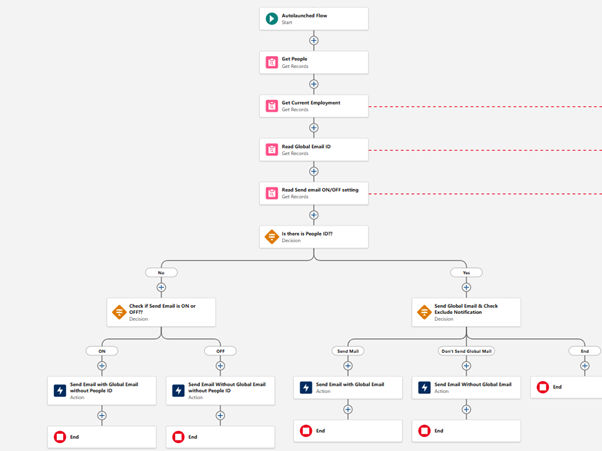
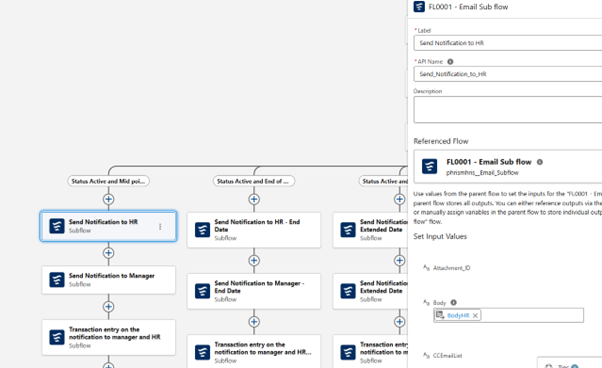
A reusable Send Email subflow was created to centralise all email-sending logic into one maintainable component.
The subflow accepts input parameters such as To, CC, BCC, Subject, Body, Attachments, Templates, and Sender Type, enabling any flow to reuse it while keeping full flexibility.
- To provide governance and safety controls, an Email ON/OFF setting was implemented using Custom Metadata or Custom Settings, allowing administrators to instantly enable or disable all automated emails without modifying individual flows.
- A Global BCC feature was also implemented using Custom Metadata, routing a copy of every outbound email to a predefined monitoring mailbox when enabled for auditing, testing, and troubleshooting.
By replacing duplicate send-email actions across multiple flows with a single subflow invocation, teams reduced maintenance overhead, improved consistency, and made future enhancements easier to roll out. Quantitative outcomes included a 70% reduction in maintenance effort and 3x faster rollout of new automations.
Get Started With Your Project
Technologies & Platforms
- Salesforce Flows
- Salesforce Custom Metadata
- Salesforce Custom Settings
- Salesforce Custom Labels
Joint Effort
The Collaboration
The work aligned multiple business teams and platform stakeholders around a single standard for outbound email communication.
Support, Sales, and Operations provided the use cases and edge cases, while admins and developers collaborated on a design that was easy to govern, safe to deploy, and flexible enough to be reused across different processes.
Work With UsThe Result
Project Outcomes
A shared component approach improved change management: updates to email behaviour and settings could be tested once and applied consistently wherever the subflow is used.
- 70% reduction in maintenance effort by eliminating duplicate email logic across flows.
- 3x faster rollout of new automations by reusing the standardised subflow.
- 95% improvement in email consistency across departments.
- 50% fewer flow errors related to recipients, templates, or misconfigured email actions.
- 100% safer deployments with the ability to disable automated emails instantly during testing.
- 90% improved audit coverage via centralised Global BCC email traceability.
Project Screenshots
FAQ's
About This Project
Got more questions? Feel free to reach out to us for more details & also get a free consulting session with our experts.